
Anúncios
Imagine measuring your room, furniture, or even a wall without pulling out a tape measure—all you need is your smartphone and a few taps on the screen.


Technology has made everyday tasks remarkably simpler, and measuring spaces is no exception. Gone are the days when you had to carry bulky tools or rely on guesswork to figure out dimensions. Today, your smartphone can handle it all with impressive accuracy and zero hassle.
Anúncios
Whether you’re redecorating, shopping for new furniture, or planning a DIY project, learning how to measure using your phone will save you time, effort, and frustration. The best part? You don’t need any technical background or special training—just your device and a willingness to try something new.
📱 Why Use Your Phone to Measure Instead of Traditional Tools?
Traditional tape measures and rulers have served us well for decades, but they come with limitations. They’re easy to misplace, awkward to use alone, and sometimes just not precise enough for complex spaces. Your smartphone, on the other hand, is always with you and equipped with advanced sensors designed for spatial measurement.
Anúncios
Modern phones use augmented reality (AR) technology and built-in sensors like LiDAR or depth cameras to calculate distances, heights, and areas. These tools are incredibly accurate and work in real-time, giving you instant feedback as you move your device around the space.
Another advantage is versatility. You can measure irregular shapes, curved surfaces, and hard-to-reach areas that would be nearly impossible with a physical tape measure. Plus, many apps allow you to save measurements, create floor plans, and share them directly with contractors or friends.
🔧 How Does Smartphone Measurement Technology Work?
Understanding the basics of how your phone measures objects helps you use the technology more effectively. Most measurement apps rely on either augmented reality or sensor data to calculate dimensions.
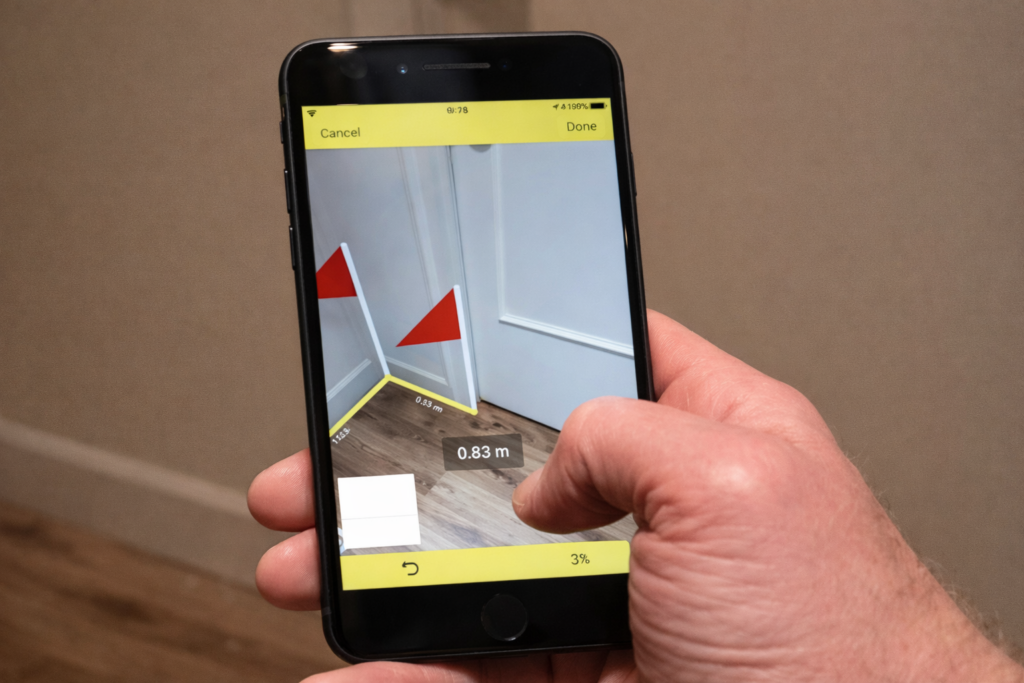
Augmented reality apps use your phone’s camera to scan the environment. As you point your device at an object, the app overlays digital markers on your screen, allowing you to select start and end points. The software then calculates the distance between these points using complex algorithms and spatial recognition.
Phones equipped with LiDAR sensors—like newer iPhone models—offer even greater precision. LiDAR sends out laser pulses that bounce off surfaces and return to the sensor, creating a detailed 3D map of your surroundings. This technology is lightning-fast and works well even in low-light conditions.
Other apps use your phone’s accelerometer and gyroscope to measure angles and slopes. By combining data from multiple sensors, these apps can provide surprisingly accurate results without requiring specialized hardware.
📲 Step-by-Step Guide to Measuring with Your Smartphone
Ready to turn your phone into a powerful measuring tool? Follow these simple steps to get started. The process is intuitive and takes just minutes to master.
Step 1: Download a Reliable Measurement App
The first thing you need is a quality measurement app. There are dozens available, but not all are created equal. Look for apps with high ratings, regular updates, and positive user reviews. Some popular options include AR-based measuring tools that leverage your phone’s camera and sensors.
Once you’ve chosen an app, download it from your device’s app store. Installation is quick, and most apps are free or offer free versions with basic features. Premium versions typically unlock advanced functions like floor plan creation or cloud storage.
Step 2: Grant Necessary Permissions
After installing the app, open it and grant the required permissions. The app will likely ask for access to your camera, location, and motion sensors. These permissions are essential for the app to function properly and deliver accurate measurements.
Don’t worry about privacy—reputable apps only use these permissions for measurement purposes. They don’t collect personal data or track your activities beyond what’s necessary for the app’s functionality.
Step 3: Calibrate the App (If Required)
Some apps require a quick calibration process to ensure accuracy. This usually involves pointing your camera at a flat surface or moving your phone in a specific pattern. Follow the on-screen instructions carefully—calibration typically takes less than 30 seconds.
Proper calibration helps the app understand your environment and improves measurement precision. If your app doesn’t require calibration, you can skip this step and move directly to measuring.
Step 4: Position Your Phone and Start Measuring
Now comes the fun part. Point your phone’s camera at the object or space you want to measure. The app will display a live view of your surroundings with digital overlays showing where measurements can be taken.
To measure a distance, tap on the starting point on your screen, then move your phone to the endpoint and tap again. The app instantly calculates the distance and displays it in your preferred unit—inches, feet, centimeters, or meters.
For measuring larger spaces like rooms, slowly pan your phone across the area. The app tracks your movement and builds a 3D map of the space. You can measure multiple dimensions at once, including width, length, and height.
Step 5: Review and Save Your Measurements
Once you’ve taken your measurements, review them on the screen. Most apps let you label each measurement for easy reference later. You can also take screenshots or use the app’s built-in save feature to store your data.
If you’re working on a project that requires multiple measurements over time, consider organizing your data into folders or projects within the app. This keeps everything tidy and easily accessible when you need it.
Step 6: Share Your Results
Many measurement apps allow you to share your results via email, text message, or cloud storage. This is incredibly useful when collaborating with others, such as contractors, interior designers, or family members helping with a home project.
You can export measurements as images, PDFs, or even 3D models depending on the app’s capabilities. This flexibility makes it easy to integrate smartphone measurements into professional workflows or personal planning.

🛋️ Practical Situations Where Phone Measurements Save the Day
Smartphone measuring tools aren’t just novelties—they’re genuinely practical for everyday situations. Here are some scenarios where this technology proves invaluable.
Furniture Shopping Made Easy
Ever bought a couch only to discover it doesn’t fit through your doorway? With a measurement app, you can quickly check dimensions before making a purchase. Measure your living room, doorways, and hallways in minutes, then compare those measurements to furniture specifications online or in-store.
This prevents costly mistakes and returns while giving you confidence that your new furniture will fit perfectly in your space.
Home Improvement Projects
Planning to paint a room, install shelving, or lay new flooring? Accurate measurements are critical for buying the right amount of materials. Your phone can measure wall areas, ceiling heights, and floor dimensions with ease.
You can even measure irregular spaces like alcoves or angled walls that would be tricky with a traditional tape measure. The app does the math for you, calculating total square footage or meterage instantly.
Real Estate and Moving
If you’re viewing potential apartments or homes, bring your phone to measure rooms and storage spaces. This helps you visualize whether your current furniture will fit and how much storage you’ll actually have.
When moving, you can measure both your current and future spaces to plan your layout before the big day. This reduces stress and helps movers work more efficiently.
Creative and Professional Projects
Photographers, interior designers, and architects increasingly rely on smartphone measurement tools for quick field measurements. These apps integrate seamlessly with design software, allowing professionals to work faster and more accurately.
Even hobbyists working on crafts, woodworking, or model building can benefit from precise measurements taken with their phones.
✨ Tips for Getting the Most Accurate Measurements
While smartphone measurement apps are remarkably accurate, following a few best practices ensures you get the best possible results every time.
Ensure Good Lighting
Your phone’s camera needs clear visibility to accurately track surfaces and distances. Measure in well-lit environments whenever possible. If you’re working in dim conditions, turn on additional lights or use your phone’s flashlight feature.
Keep Your Lens Clean
Smudges and fingerprints on your camera lens can interfere with the app’s ability to read your environment. Take a moment to wipe your lens with a soft cloth before measuring for optimal clarity.
Move Slowly and Steadily
Rapid movements can confuse the app’s sensors and lead to inaccurate readings. Move your phone smoothly and deliberately when scanning spaces or selecting measurement points. Patience pays off with better precision.
Measure Twice for Critical Dimensions
For important measurements—like those for custom furniture or construction projects—take multiple readings to confirm accuracy. If the app consistently gives you the same result, you can trust that measurement.
Use Reference Objects When Possible
If your app supports it, calibrate measurements against known dimensions. For example, measure an object you’ve already measured with a physical tape measure to verify the app’s accuracy in your specific environment.
🌟 Introducing a Game-Changing Measurement App
Among the many measurement apps available today, one stands out for its combination of simplicity, accuracy, and powerful features. This app uses your phone’s camera and sensors to deliver professional-grade measurements without requiring any technical expertise.
The interface is refreshingly intuitive—open the app, point your camera, and start measuring. Visual guides walk you through each step, making it perfect for first-time users. Yet beneath its simple exterior lies sophisticated technology that delivers measurements accurate to within a few millimeters.
The app supports both imperial and metric units, and you can switch between them instantly. It measures distances, heights, areas, angles, and even creates basic floor plans. Advanced features include the ability to export measurements as PDFs, save project folders, and integrate with popular design software.
What really sets this app apart is its reliability across different phone models. Whether you have the latest flagship device with LiDAR or an older model with standard cameras, the app optimizes performance for your hardware. This inclusive approach means more people can access professional measurement tools regardless of their phone’s age or price point.
Regular updates keep the app current with the latest operating systems and device capabilities. The development team actively listens to user feedback, continually refining features and adding new functionality based on real-world needs.
🎯 Common Mistakes to Avoid When Measuring with Your Phone
Even with user-friendly apps, there are a few pitfalls that can affect accuracy. Being aware of these common mistakes helps you avoid frustration and get reliable results.
Measuring at Awkward Angles
Try to keep your phone perpendicular to the surface you’re measuring. Angled measurements can introduce errors, especially over longer distances. Position yourself so you can hold the phone naturally and comfortably aligned with your target.
Ignoring Environmental Factors
Reflective surfaces, transparent objects, and very dark materials can sometimes confuse measurement apps. If you’re getting inconsistent results, try adjusting the lighting or measuring from a slightly different angle.
Not Allowing the App to Stabilize
When you first open a measurement app, give it a moment to orient itself to your environment. Starting measurements immediately after launching the app can lead to inaccurate readings. Wait for any on-screen indicators showing the app is ready.
Forgetting to Update the App
App developers regularly release updates that improve accuracy, fix bugs, and add new features. Make sure you’re running the latest version to benefit from these improvements. Enable automatic updates if your app store supports it.
🚀 The Future of Smartphone Measurement Technology
We’re only beginning to scratch the surface of what’s possible with smartphone-based measurement. As hardware improves and artificial intelligence becomes more sophisticated, these apps will become even more powerful and versatile.
Future developments may include real-time 3D modeling of entire buildings, integration with virtual reality for immersive planning experiences, and AI-powered suggestions for furniture placement and interior design. Some apps are already experimenting with machine learning to automatically recognize objects and suggest optimal arrangements.
The democratization of measurement technology means that tasks once requiring expensive equipment or professional expertise are now accessible to everyone. This empowers people to take on projects they might have previously considered too complicated or intimidating.
As more phones incorporate advanced sensors like LiDAR, the baseline accuracy of measurement apps will continue to rise. What seems impressive today will be standard tomorrow, opening up new possibilities for creativity, productivity, and problem-solving.
💡 Ready to Transform How You Measure? Give It a Try Today
You now have everything you need to start measuring environments and objects using just your smartphone. The technology is mature, accessible, and remarkably easy to use—no technical background required, no expensive equipment needed, just your phone and a willingness to try something new.
Download a measurement app today and experiment with measuring items around your home. Start with something simple, like the dimensions of a table or the width of a doorway. As you become comfortable with the process, move on to more complex projects like measuring entire rooms or planning furniture arrangements.
The convenience and accuracy of smartphone measurements will quickly become indispensable in your daily life. Whether you’re tackling home improvement projects, shopping for furniture, or simply satisfying your curiosity about dimensions, this technology puts powerful tools literally at your fingertips.
Don’t wait for the “perfect” moment or project—start exploring this technology now. The sooner you become familiar with measurement apps, the sooner you’ll discover creative new ways to use them. You might be surprised at how often you reach for your phone instead of a tape measure.
The future of measurement is already here, and it fits in your pocket. Take advantage of this incredible technology and see for yourself just how simple, fast, and accurate smartphone measurements can be. Your next project starts with a single download—why not make it today? 📐✨
